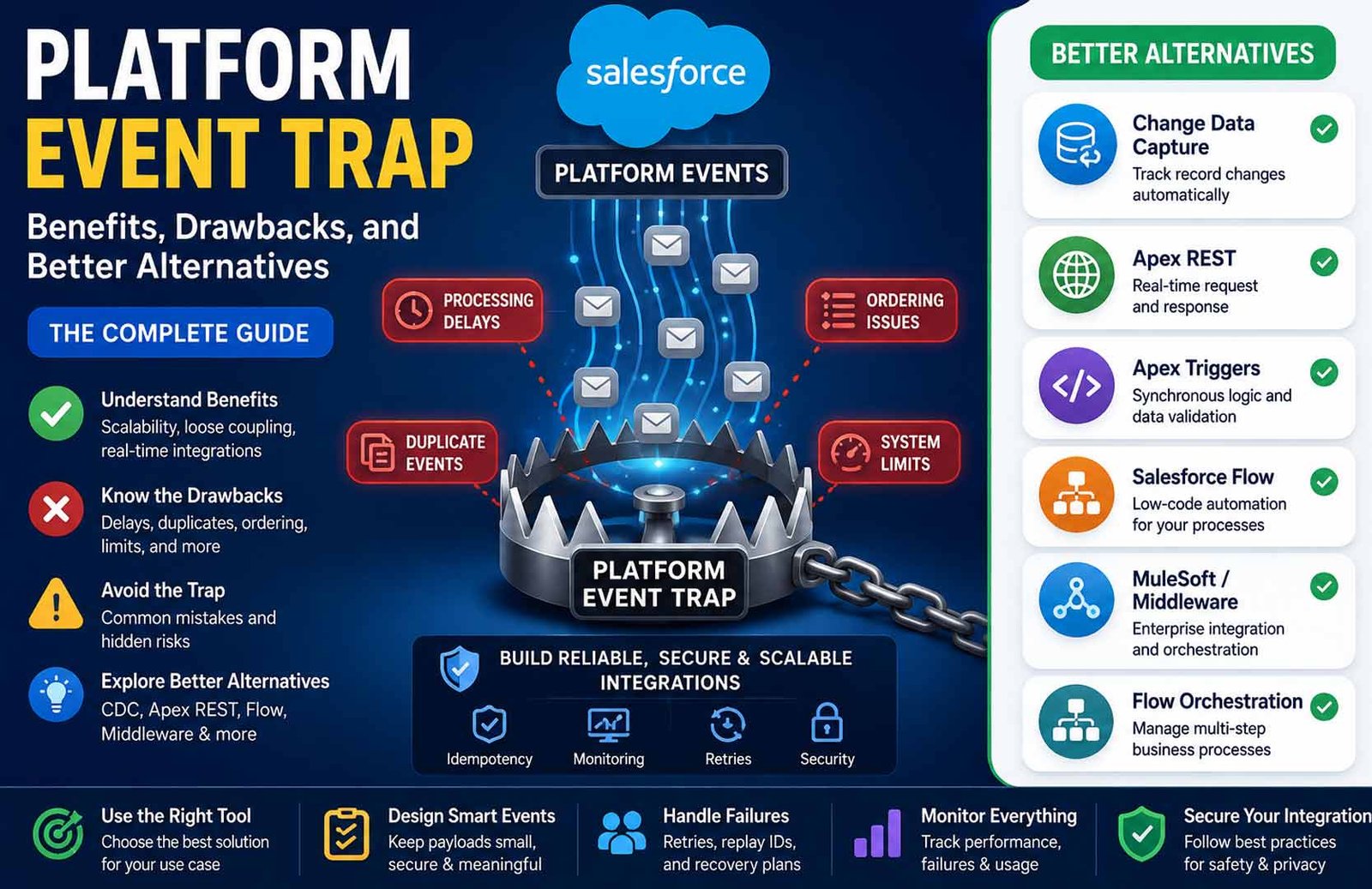
A Platform Event Trap usually refers to common mistakes that make Salesforce Platform Events unreliable in real-world environments. These problems often appear after deployment, even if everything worked well during testing. They can lead to duplicate processing, missing events, slow integrations, or unexpected system failures.
Some people also use the term Platform Event Trap (PET) in server management, where it describes hardware alerts sent through IPMI. However, most people searching for this topic want to understand the Salesforce meaning, which is the main focus of this guide.
In this article, you’ll learn how Platform Events work, the biggest mistakes to avoid, their benefits and drawbacks, when to use them, and which alternatives may be a better choice for your project.
What Is a Platform Event Trap?
A Platform Event Trap is a name used for a group of mistakes that can make Salesforce Platform Events fail or behave in unexpected ways. It is not an official Salesforce product or setting. Instead, it describes situations where an event-driven solution looks correct during development but becomes unreliable after it is deployed.
These problems usually happen because Platform Events work differently from normal Salesforce transactions. Since they process information asynchronously, developers cannot expect every event to be delivered immediately or in exactly the same way as a direct database operation.
When these differences are ignored, businesses may experience problems such as:
-
Events processed more than once
-
Events arriving in the wrong order
-
Missing or delayed workflows
-
Failed integrations
-
Data inconsistencies
-
Production performance issues
-
Difficult troubleshooting
Many of these issues stay hidden during testing because development environments often have fewer users, smaller data volumes, and fewer connected systems than production environments.
Understanding these common traps before building an event-driven solution helps create systems that are easier to maintain, monitor, and scale over time.
Salesforce Platform Event Trap vs IPMI Platform Event Trap
The phrase Platform Event Trap can refer to two completely different technologies. Knowing the difference helps avoid confusion, especially when searching online.
Salesforce Platform Event Trap
In Salesforce, the term describes common mistakes made while designing or managing Platform Events. It focuses on software architecture rather than hardware.
Typical problems include:
-
Assuming events always arrive in order
-
Ignoring duplicate event delivery
-
Exceeding platform limits
-
Weak monitoring
-
Missing retry logic
-
Security configuration mistakes
These issues mainly affect developers, administrators, and architects who build event-driven applications.
IPMI Platform Event Trap
In server and data-center management, Platform Event Trap (PET) is an official hardware alert mechanism used by IPMI (Intelligent Platform Management Interface).
Instead of business events, it reports hardware problems such as:
These alerts are commonly delivered through SNMP traps to monitoring software so system administrators can respond quickly to hardware failures.
Although both meanings involve “events” and “alerts,” they solve completely different problems.
Salesforce Platform Event TrapIPMI Platform Event TrapSoftware and cloud applicationsPhysical server hardwareBusiness workflowsHardware monitoringUsed by Salesforce developersUsed by IT and data-center administratorsFocuses on event-driven architectureFocuses on server health alerts
The rest of this article focuses on the Salesforce Platform Event Trap, since that is the meaning most readers are looking for.
How Salesforce Platform Events Work
To understand the Platform Event Trap, you first need to understand how Platform Events work.
Salesforce Platform Events allow different systems to communicate without being directly connected. Instead of one application calling another immediately, a system publishes an event and Salesforce delivers it to any subscribers that are interested.
This follows a publish-subscribe model.
A publisher creates an event whenever something important happens. Salesforce places that event on the Event Bus. Subscribers then receive the event and perform their own tasks independently.
For example, one published event could trigger:
-
An Apex trigger
-
A Salesforce Flow
-
An external ERP system
-
Middleware
-
A reporting system
Each subscriber works separately, so one event can start multiple business processes at the same time.
Because everything happens asynchronously, the publisher does not wait for every subscriber to finish. This improves scalability, but it also introduces new challenges that developers must handle carefully.
Another important part of Platform Events is the Replay ID. Every event receives a Replay ID that subscribers can use to continue processing after temporary interruptions. If a subscriber disconnects for a short period, Replay IDs may allow it to receive missed events that are still within the available retention window.
Platform Events are designed for streaming event data rather than long-term storage. They cannot be queried like normal Salesforce records with SOQL or SOSL, so developers often create separate logging or tracking systems if they need permanent event history.
The Main Benefits of Salesforce Platform Events
Salesforce Platform Events offer several advantages when they are used for the right type of work. They help organizations build flexible systems that can grow without creating tight connections between different applications.
One of the biggest benefits is loose coupling. Publishers do not need to know which applications will receive an event. They simply publish the event, and every subscriber handles its own work independently. This makes it easier to add or remove integrations later without changing the publishing application.
Another benefit is scalability. Multiple subscribers can process the same event at the same time. As business systems grow, new subscribers can often be added without redesigning the entire architecture.
Platform Events also support background processing. Since work happens asynchronously, users do not have to wait for every connected system to finish before continuing their own tasks. This reduces direct dependencies between systems and helps distribute processing across different services.
They are especially useful for integrations between Salesforce and other business applications. Common examples include syncing customer records, updating inventory systems, notifying external services, triggering marketing platforms, and starting automated workflows after important business events occur.
For organizations that process large numbers of events, High-Volume Platform Events can provide higher throughput while supporting large-scale event-driven architectures. However, they still require careful planning, monitoring, and error handling.
These advantages make Platform Events a strong choice for many enterprise integrations, provided they are designed with their asynchronous nature in mind.
The Main Drawbacks and Limitations
While Platform Events are powerful, they are not the right solution for every problem. Many Platform Event Traps happen because developers expect them to behave like synchronous operations.
The biggest limitation is that Platform Events do not guarantee immediate processing. An event may be handled almost instantly, but delays can also happen depending on system load, subscriber performance, and other factors. Because of this, they should not be used when users expect immediate feedback on the screen.
Another challenge is event delivery. Developers should not assume that every event will always arrive in perfect order or only once. Subscriber logic must be prepared to handle duplicate deliveries and situations where events arrive out of sequence.
Platform Events also work within Salesforce platform limits. Event publishing, delivery, subscriber processing, CPU time, and other governor limits can affect how reliably a solution performs as traffic increases.
Monitoring is another important requirement. Since event processing happens in the background, failures may not be obvious. Without logging, alerts, and retry mechanisms, problems can remain hidden until they affect business operations.
Platform Events are also temporary by design. They are intended for streaming information rather than permanent record storage, which means organizations often need additional logging if they require long-term reporting or auditing.
Finally, debugging asynchronous systems is usually more difficult than debugging synchronous code. Developers often need extra tools, monitoring dashboards, and processing logs to understand where failures occurred.
Common Platform Event Traps
Even well-designed Salesforce projects can run into problems if Platform Events are not used correctly. Most Platform Event Traps happen because developers expect asynchronous systems to behave like synchronous ones. Understanding these common mistakes helps you build more reliable applications.
Treating Asynchronous Events Like Synchronous Calls
Platform Events do not finish immediately after they are published. The publisher sends an event and continues its work while subscribers process the event later.
Problems appear when developers expect an instant result. For example, using Platform Events to update a user interface immediately after a button click can create delays or incomplete results.
A better approach is to use Platform Events only for background processing. If users need an immediate response, synchronous tools such as Apex triggers, Apex methods, or Lightning components are usually a better choice.
Assuming Events Always Arrive in Order
Many developers believe events will always arrive in the same order they were published. This is not always true, especially when multiple transactions or subscribers are involved.
If one event depends on another, incorrect ordering can lead to outdated information or incorrect business actions.
To reduce this risk:
-
Add sequence numbers or version numbers.
-
Include timestamps when helpful.
-
Check the current record state before processing.
-
Design subscribers so they can safely handle events that arrive out of order.
Failing to Handle Duplicate Events
Platform Events may occasionally be delivered more than once. If subscriber logic is not prepared, duplicate processing can create unwanted results.
For example, the same event might:
The safest solution is idempotent processing. This means processing the same event several times produces the same final result as processing it once. Using unique business identifiers and tracking processed events helps prevent duplicates.
Exceeding Event and Governor Limits
Platform Events still operate within Salesforce limits. Large event volumes, complex subscriber logic, or inefficient code can slow processing or cause failures.
Good practices include:
-
Process records in batches whenever possible.
-
Keep subscriber logic efficient.
-
Monitor event usage regularly.
-
Plan capacity before business growth creates problems.
Always check the latest Salesforce documentation because platform limits may change between editions and releases.
Testing Only in Small Development Environments
A solution that works perfectly in a Developer Edition or a lightly used sandbox may fail after deployment.
Production systems usually have:
Before deployment, test with production-like data, realistic workloads, and multiple integrations. This helps reveal problems that small test environments may hide.
Missing Retry and Recovery Logic
Network interruptions, temporary service failures, or subscriber errors can prevent events from being processed successfully.
A reliable Platform Event solution should include:
Without these safeguards, failed events may never be processed.
Weak Monitoring
Since Platform Events run in the background, users may not notice failures immediately.
A monitoring system should track:
-
Published events
-
Failed events
-
Processing delays
-
Subscriber performance
-
Replay issues
-
Event usage
Good monitoring allows administrators to fix problems before they affect business operations.
Security Misconfigurations
Poor security settings can stop subscribers from working correctly or expose sensitive information.
Review security regularly by checking:
Only authorized systems should receive and process business events.
Poor Documentation
As Platform Event systems grow, documentation becomes increasingly important.
Useful documentation should explain:
-
Event names
-
Field definitions
-
Publishers
-
Subscribers
-
Processing flow
-
Error handling
-
Monitoring rules
-
Ownership
Good documentation makes future maintenance much easier.
How Replay IDs and Event Retention Work
Every Platform Event receives a Replay ID when Salesforce publishes it. Subscribers can use this Replay ID to continue processing after a temporary disconnection.
For example, if a subscriber loses its connection for a short time, Replay IDs may allow it to receive missed events that are still available in Salesforce’s event retention window.
Replay IDs should not be treated as permanent business identifiers. They are designed to help subscribers recover from temporary interruptions, not replace application-level tracking.
Salesforce stores Platform Events for only a limited period. The exact retention period depends on the event type and Salesforce implementation. Developers should always verify the current retention policy in the latest Salesforce documentation because these details may change over time.
High-Volume Platform Events
High-Volume Platform Events (HVPE) are designed for organizations that publish very large numbers of events every day.
They are commonly used for:
Although HVPE supports much higher throughput than standard Platform Events, it does not remove architectural challenges.
Developers still need to design for:
Higher capacity improves scalability, but good design remains essential.
How to Build a Reliable Platform Event System
A reliable Platform Event system depends on careful planning rather than complex code.
Design the Event Carefully
Keep each event focused on one business purpose.
Good event design includes:
-
Small payloads
-
Clear field names
-
Unique business identifiers
-
Version information when needed
-
Only the data subscribers actually require
Smaller events are easier to process and maintain.
Build Safe Subscribers
Subscribers should work independently.
Good subscriber design includes:
Subscribers should never assume another subscriber has already completed its work.
Create a Recovery Process
Every production system should have a recovery strategy.
A good recovery process includes:
Planning for failures makes systems far more reliable.
Monitor the Full Event Flow
Monitoring should cover the complete event lifecycle.
Important metrics include:
-
Event publication
-
Processing time
-
Failed subscribers
-
Retry attempts
-
Event backlog
-
Overall system health
Monitoring allows problems to be detected before users notice them.
Secure Every Connection
Security should be part of the design from the beginning.
Use:
-
OAuth authentication
-
Secure connections
-
Least-privilege permissions
-
Regular permission reviews
-
Secure credential management
Only trusted applications should publish or receive business events.
When You Should Use Platform Events
Platform Events work best when processes do not require an immediate response.
Common use cases include:
-
Salesforce and ERP integration
-
Customer data synchronization
-
Inventory updates
-
Marketing automation
-
Cross-cloud communication
-
External notifications
-
Audit logging
-
Event-driven automation
-
Background workflows
-
IoT messaging
They are especially useful when several systems need to react to the same business event independently.
When You Should Avoid Platform Events
Platform Events are not the best solution for every situation.
Consider another technology if your project needs:
-
Immediate user interface updates
-
Instant validation before saving data
-
Strict transaction sequencing
-
Guaranteed immediate completion
-
Large synchronous data transfers
Choosing the correct technology often prevents a Platform Event Trap before development even begins.
Common Problems and Troubleshooting
Platform Events Work in Sandbox but Fail in Production
This usually happens because production systems have more users, more integrations, and higher workloads.
Review:
-
User permissions
-
Subscriber logs
-
Event volume
-
Governor limits
-
Production-like testing
The Same Event Is Processed More Than Once
Use unique business identifiers and idempotent subscriber logic. Track processed events before running business actions.
Events Arrive in the Wrong Order
Use timestamps, sequence numbers, or version information. Always verify the current business state before applying updates.
Events Appear to Be Missing
Check publishing logs, Replay IDs, subscriber errors, permissions, and the event retention window.
Event Processing Is Too Slow
Review subscriber performance, reduce payload size, simplify processing logic, and monitor CPU usage and external API calls.
External Subscribers Cannot Connect
Check authentication, OAuth configuration, certificates, network access, Named Credentials, and subscriber permissions.
Security and Privacy Best Practices
Platform Events often carry important business information, so security should always be considered.
Follow these practices:
-
Publish only necessary data.
-
Avoid storing passwords or secrets in events.
-
Use secure authentication.
-
Encrypt external communication.
-
Apply least-privilege permissions.
-
Review access regularly.
-
Keep audit logs when appropriate.
Good security protects both business systems and customer information.
Platform Event Trap Best Practices Checklist
Before deploying a Platform Event solution, confirm that you have:
-
Designed for asynchronous processing.
-
Added unique business identifiers.
-
Built idempotent subscribers.
-
Planned for duplicate events.
-
Tested production-like workloads.
-
Created retry and recovery processes.
-
Configured monitoring and alerts.
-
Reviewed security settings.
-
Documented publishers and subscribers.
-
Planned for future growth.
Bottom Line
A Platform Event Trap is not a Salesforce product. It is a collection of common mistakes that can make event-driven systems unreliable if they are not designed carefully.
Salesforce Platform Events offer powerful benefits for integrations, automation, and scalable architectures. However, they also require careful planning for asynchronous processing, duplicate delivery, monitoring, security, and recovery.
For projects that need immediate responses, strict transaction control, or simple record validation, alternatives such as Apex Triggers, Apex REST, Salesforce Flow, or Change Data Capture may provide a better solution.
Choosing the right technology and following good design practices will help you avoid most Platform Event Traps and build reliable Salesforce solutions.
(FAQs)
Are Salesforce Platform Events synchronous?
No. Platform Events are asynchronous, so processing happens in the background instead of immediately.
Can Platform Events be delivered more than once?
Yes. Subscriber logic should be designed to safely handle duplicate event delivery through idempotent processing.
Does Salesforce guarantee Platform Event order?
No. Developers should not rely on strict ordering across all transactions or subscribers and should build logic that can safely handle out-of-order events.
Can I query Platform Events with SOQL?
No. Platform Events are designed for event streaming rather than permanent record storage, so they cannot be queried like normal Salesforce objects.
What happens if Platform Event processing fails?
Recovery depends on your implementation. Good designs use Replay IDs, retry logic, monitoring, logging, and recovery procedures to process missed or failed events.
Keep Reading:
Crypto30x.com Review: Features, Risks, and Trading Tools Explained








 Life Style1 year ago