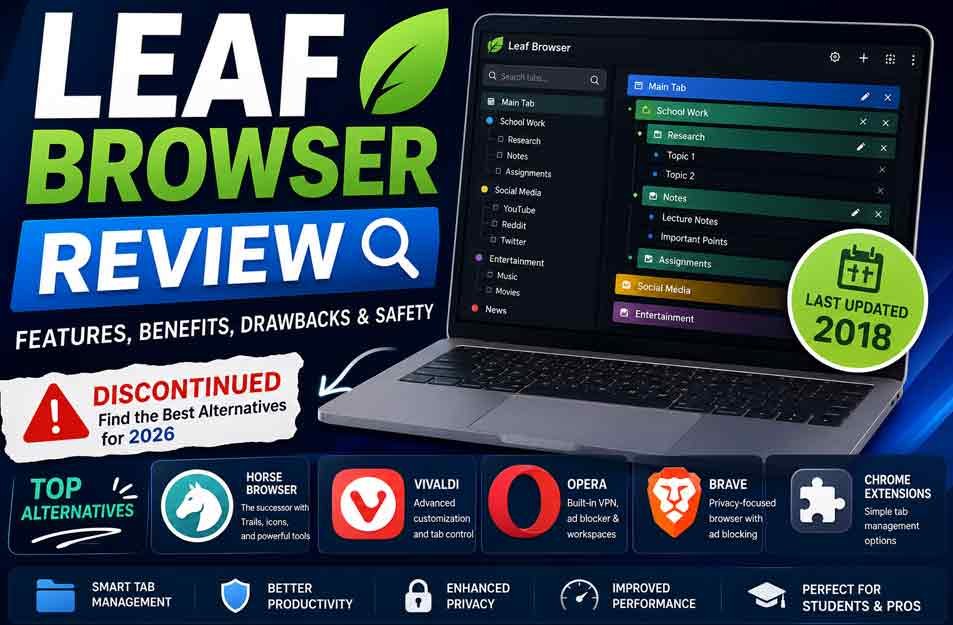
Leaf Browser was an older Chrome extension made to help users manage many browser tabs. It became known for its hierarchical tab system, sidebar navigation, tab colors, and tools that could reduce the use of computer memory.
People still search for Leaf Browser because its tab system was different from normal Chrome tabs, and many users want to know if it still works today. This review explains what Leaf Browser was, how it worked, its main features, benefits, drawbacks, and why users now look for newer alternatives.
What Is Leaf Browser?
Leaf Browser was a Chrome extension built mainly for tab management. Instead of showing every open page in one long row, it gave users a way to arrange tabs in a tree-like structure.
This meant users could create a main tab and place related pages under it. Those pages could then have their own smaller groups. The system was useful for people who often worked with many pages at the same time.
For example, someone researching a school topic could keep the main research page at the top. Articles, sources, notes, and other related pages could then be placed underneath it. This made the browsing session easier to understand.
Leaf Browser was not a normal standalone browser like Chrome, Firefox, or Brave. It worked as an extension connected to Chrome. This also meant that its use was closely tied to the Chrome browser and the ChromeOS environment.
The extension was also reported to be popular in some educational settings. Some users associated Leaf Browser with accessing websites that were blocked by school networks. However, its main purpose was tab organization, not serving as a general network bypass tool.
Leaf Browser History and Development
Leaf Browser first appeared on the Chrome Web Store on May 11, 2016, according to the source provided for this review. It was originally listed under the name Leaf Browser Alpha.
The developer named in the source is Sam Lanning. The extension gained attention because it offered a different way to handle browser tabs at a time when most browsers used a simple horizontal tab bar.
Its main idea was useful for users who regularly had many pages open. Students could group research pages, while professionals could arrange pages around different tasks or projects.
The available source reports that development stopped around 2018. This is an important part of Leaf Browser’s history because browser extensions need updates to remain useful and secure as browser technology changes.
An extension that has not been developed for many years may face problems with newer browser versions. It may also lack security improvements that are common in actively maintained software.
This is why the Leaf Browser people remember from the past is different from what a user should expect from an extension today. Its original features may still sound useful, but its age is now one of its biggest limitations.
How Did Leaf Browser Work?
Leaf Browser was built around a hierarchical tab system. Instead of treating every page as a separate item, it allowed users to place related pages into groups.
The structure could include:
-
Main tabs
-
Subtabs
-
Sub-subtabs
This gave users more control over large browsing sessions. A main tab could represent a project, while smaller tabs underneath it could contain the websites needed for that project.
The extension also used a sidebar for navigation. Rather than searching through a crowded row of browser tabs, users could look through the sidebar and select the page they wanted.
Another part of its design was tab customization. Users could rename tabs and use colors to make different pages easier to recognize.
Leaf Browser also included a resource-saving approach. The supplied source says users could “turn off” inactive pages. The purpose was to reduce memory use when many pages were open.
This was useful because having a large number of active web pages can use significant browser resources. By managing inactive pages, Leaf Browser aimed to keep browsing more manageable.
Main Leaf Browser Features
Hierarchical Tabs
The hierarchical tab system was the main feature that made Leaf Browser different from a standard Chrome setup.
Users could arrange related pages in levels. A main page could contain several subtabs, and those subtabs could contain additional pages.
This structure was useful for research, school work, writing, planning, and other tasks that required many related websites.
Tab Renaming
Leaf Browser allowed users to rename tabs. This could make pages easier to identify when several websites had similar titles.
For example, instead of seeing long or unclear website titles, a user could give pages short names that matched their purpose.
This was a small feature, but it could make a large collection of tabs easier to manage.
Color Organization
The extension also allowed users to use colors for visual organization.
Different colors could help separate groups of pages. For example, one color could represent research pages while another could represent notes or reference material.
This gave users another way to understand their browsing structure without opening every page.
Sidebar Navigation
Leaf Browser included a sidebar for quick access to tabs.
The sidebar was especially useful when a user had many pages open. It gave the user a separate view of the browsing structure instead of relying only on Chrome’s normal tab bar.
The sidebar also worked with the extension’s hierarchical system, making it easier to move between related pages.
Resource Management
Leaf Browser was designed to help manage browser resources when many pages were open.
The source says inactive pages could be “turned off” to reduce memory use. This could help users who worked with a large number of tabs.
However, this feature should not be confused with modern browser performance tools. Leaf Browser is old software, so its resource-management methods may not work in the same way on current Chrome versions.
Chrome and ChromeOS Support
Leaf Browser was designed for Chrome and was also associated with ChromeOS.
This made it relevant to Chromebook users, including students who used school devices. However, modern Chrome and ChromeOS systems can differ greatly from the systems available when Leaf Browser was developed.
A school-managed Chromebook may also prevent users from installing extensions or changing browser settings. So historical ChromeOS support does not mean that Leaf Browser will work on every Chromebook today.
Benefits of Leaf Browser
Leaf Browser’s biggest benefit was its approach to organizing large numbers of tabs. Normal browser tabs can become difficult to manage when dozens of pages are open. Leaf Browser gave users a structured way to group related pages.
Its hierarchical system was especially useful for research and study. Users could keep pages connected to the same task together instead of placing everything in one long list.
The tab colors and renaming tools also made the interface easier to understand. Users could give important pages clear names and use colors to separate different groups.
Another benefit was its focus on inactive pages. The ability to turn off inactive pages was intended to reduce memory use and make large browsing sessions easier to handle.
Leaf Browser was also relatively focused in its purpose. It was built around tab organization instead of trying to combine many unrelated services into one browser.
For users who liked structured browsing, this simple idea was one of the extension’s main strengths.
Leaf Browser Drawbacks and Limitations
The biggest problem with Leaf Browser today is its age. The supplied source reports that development stopped around 2018. That means it has not kept pace with modern browser changes.
A lack of updates can lead to compatibility problems. An extension created many years ago may not work correctly with newer versions of Chrome or may lose access to features it once depended on.
Security is another concern. Browser extensions can have access to parts of a user’s browsing activity or web pages. Software that has not received updates for years does not offer the same level of ongoing security support as actively maintained software.
Leaf Browser also had limited platform support. Its connection to Chrome and ChromeOS meant it was not designed as a cross-platform browser with the wide device support found in many modern browsers.
It also lacks many features users may expect from current browsers. Modern alternatives can include stronger privacy controls, updated security systems, built-in notes, synchronization, ad blocking, advanced workspace tools, and other productivity features.
There is also a practical problem with finding the old extension. Archived copies may exist, but downloading an old extension from an unknown website can create security risks. An archived file is not automatically safe simply because it is an older version of a once-popular extension.
For these reasons, Leaf Browser’s original features can still be interesting, but its current limitations are important. Users who need reliable tab management today should consider whether a modern, actively supported alternative would be a better choice.
Is Leaf Browser Safe to Use Today?
Leaf Browser should be treated with caution today because it is old software. The available source reports that development stopped around 2018. A browser extension that has not received updates for many years may not work well with current browsers and may not include newer security fixes.
The main concern is not simply that Leaf Browser is old. Browser technology changes over time, and extensions may need updates to remain compatible with new security rules and browser systems.
Old copies may still appear on archive or third-party websites. However, users should be careful with these files. An unofficial copy may have been changed, damaged, or bundled with unwanted software.
For this reason, users should not install an old Leaf Browser copy just because they find a download online. If the extension is no longer officially supported, a modern and maintained tab-management tool is usually the safer choice.
Leaf Browser Privacy and Security
There is not enough current information in the supplied source to make strong claims about Leaf Browser’s present privacy practices. It should therefore not be described as a privacy-focused extension.
Browser extensions can have access to web pages and other browser data depending on the permissions they request. Users should always check an extension’s permissions before installing it, especially when dealing with old software.
Leaf Browser also does not have the benefit of regular security updates. Modern browsers and extensions can change their security systems over time, so an extension built for an older browser environment may not provide the same protection as current software.
Anyone handling private accounts, work information, financial data, or other sensitive information should be especially careful with unsupported extensions. An actively maintained browser or extension is generally a better choice for current browsing needs.
Leaf Browser Compatibility and Availability
Leaf Browser was designed for Chrome and was also used on ChromeOS. Its old design, however, means that compatibility with current versions of Chrome cannot be assumed.
This is especially important for Chromebook users. A Chromebook may run a current version of ChromeOS even though Leaf Browser was built for an older browser environment. The extension may therefore fail to install, fail to work correctly, or lack access to functions it once used.
School Chromebooks can have another limitation. School administrators may control which extensions students can install. They may also block certain websites or browser settings. A user cannot assume that an extension will work simply because the device is a Chromebook.
The same issue applies to availability. An old copy found in an archive is not the same as an officially supported version. The supplied source says archived copies of Leaf Browser Alpha may still exist, but their safety and current compatibility are concerns.
Leaf Browser Alternatives in 2026
Users who want the same general idea as Leaf Browser now have several modern choices. The best option depends on whether the user cares most about tab organization, privacy, customization, or staying with Chrome.
Horse Browser
Horse Browser is presented in the supplied source as a close modern alternative to Leaf Browser. Its Trails system is designed to organize pages in a structured way, which makes it useful for people who liked Leaf Browser’s hierarchical approach.
It also offers custom icons and emojis for visual organization. Other reported features include notes, drag-and-drop folder management, a password manager, an ad blocker, dark mode, and export to Notion.
Horse Browser may suit students and professionals who need to keep many related pages together. Its resource-management features are also aimed at users who work with many open pages.
The supplied source describes Horse Browser as a successor to Leaf Browser. That should be treated as a reported description rather than an independently confirmed official relationship unless stronger evidence is available.
Vivaldi
Vivaldi Technologies’s Vivaldi browser is a good option for users who want more control over their browser.
Its tab tools include tab stacking and tab tiling. It also offers built-in notes, synchronization, reader mode, and many interface settings.
Vivaldi is different from Leaf Browser because it is a complete web browser rather than a small Chrome extension. It gives users many more tools, but that can also make it harder for new users to understand.
It may be a better choice for people who want advanced tab management together with deep browser customization.
Opera
Opera offers a broader set of browser features than Leaf Browser.
Its reported features include Workspaces, a sidebar, an ad blocker, and a built-in VPN service. The sidebar can also provide quick access to other tools and messaging services.
Opera is useful for users who want several features inside one browser instead of adding separate extensions. However, its Workspaces system is not the same as Leaf Browser’s hierarchical tab structure.
It may be a better fit for users who want an all-in-one browser with built-in productivity and privacy tools.
Brave
Brave Software’s Brave browser focuses strongly on privacy and blocking unwanted web content.
Brave includes built-in ad and tracker blocking. Blocking these elements can also reduce the amount of content a page needs to load, which may help browsing speed in some cases.
It also provides vertical tab organization and other browser features. However, its tab system is not as close to Leaf Browser’s tree-style structure.
Brave is best suited to users who care more about privacy and content blocking than having a direct replacement for Leaf Browser’s tab system.
Tree Tab Sidebar
Tree Tab Sidebar is a simpler option for people who want to keep using Chrome while adding a more organized view of their tabs.
Its main idea is to show tabs in a vertical list through a sidebar. This can be easier to manage than a crowded horizontal tab bar.
It does not provide the full set of features associated with Leaf Browser. The supplied source describes it as a basic option and notes limits such as the lack of dragging, dropping, and tab renaming.
It is therefore more suitable for users who need simple tab organization rather than a full Leaf Browser-style experience.
Tab Outliner
Tab Outliner is another Chrome-related option for users who prefer hierarchical tab organization.
It can arrange open tabs into a structured tree. This makes it closer to Leaf Browser’s main idea than a simple vertical tab list.
The trade-off is that its interface can be more complex. New users may need some time to understand how its organization system works.
It can be useful for people who care more about detailed tab organization than having a simple interface.
Can You Still Download Leaf Browser?
The supplied source says that old copies of Leaf Browser Alpha may still be available through archives. However, finding an archived copy does not mean that it is safe or useful on a modern computer.
The first concern is the source. An unofficial download may not be the same file that was originally released. It may also be modified or bundled with unwanted software.
The second concern is compatibility. Even if the original extension file is genuine, it may not work correctly with current Chrome versions.
The third concern is security. Leaf Browser has not received the regular updates expected from modern software, according to the supplied information.
For these reasons, users should be very careful about installing an archived Leaf Browser copy. A maintained alternative is usually a more practical choice for everyday browsing.
Migrating From Leaf Browser
Moving away from Leaf Browser may require some manual work because its old tab structure may not transfer directly into another browser.
The first step is to save important bookmarks and websites. If a browser supports bookmark import, those saved links can usually be moved into the new browser.
Users should also record important tab groups before removing Leaf Browser. A simple list or bookmark folder can help recreate a research project or work setup later.
The supplied source says Horse Browser has import features for bookmarks and frequently visited websites. However, this does not mean that every part of Leaf Browser’s hierarchical structure will transfer automatically.
For important projects, it is better to preserve the information first and then move to the new browser. This reduces the risk of losing useful websites or research material.
Pros and Cons at a Glance
ProsConsHierarchical tab organizationDevelopment reportedly stopped around 2018Tab renamingPossible problems with modern ChromeTab colorsNo regular modern security updatesSidebar navigationLimited platform supportInactive-page managementFewer modern browser featuresUseful for large tab collectionsArchived downloads may create security risksLightweight designNot a modern privacy-focused browser
Leaf Browser was useful because it solved a real problem: managing large numbers of tabs. Its structure was more organized than a normal browser tab bar.
Its main weakness today is that the software is no longer actively developed. The same features that made it useful years ago do not remove the security and compatibility concerns that come with old software.
Bottom Line
Leaf Browser was an older Chrome extension built around a useful idea: giving users a better way to organize many browser tabs. Its hierarchical tabs, sidebar, colors, renaming tools, and inactive-page management made it different from a standard Chrome tab setup.
The main issue today is its age. With development reportedly ending around 2018, users should not expect the compatibility, security updates, or modern features offered by actively maintained browsers and extensions.
For someone who only wants basic tab organization, a modern Chrome extension may be enough. Users who want a more complete replacement can consider Horse Browser, Vivaldi, Opera, or Brave based on their needs.
Leaf Browser remains useful as a piece of browser-extension history, but for everyday browsing in 2026, a current and supported alternative is the safer and more practical choice.
(FAQs)
What happened to Leaf Browser?
Leaf Browser was developed as a Chrome extension for advanced tab management. The supplied source reports that its development stopped around 2018. Since then, users have looked for newer tools with similar tab organization features and current security support.
Was Leaf Browser a browser or a Chrome extension?
Leaf Browser was primarily a Chrome extension, not a standalone browser. It was designed to work with Chrome and was also associated with ChromeOS.
Was Leaf Browser safe?
Leaf Browser should be approached with caution today because it is old and reportedly has not been updated since 2018. Users should be especially careful with archived copies from unknown websites. A current, actively maintained alternative is generally a better choice.
What is the best Leaf Browser alternative?
The best choice depends on the user’s needs. Horse Browser is presented as a close alternative for structured tab organization. Vivaldi is better for deep customization, Brave is aimed at privacy-focused browsing, and Opera offers a broad set of built-in tools.
Can Leaf Browser work on a Chromebook?
Leaf Browser was associated with ChromeOS, but that does not guarantee that it will work on a modern Chromebook. Current ChromeOS versions and school device controls may prevent an old extension from installing or working correctly.
Keep Reading:
NS Mainframe Explained: What It Is and How It Works







 Life Style1 year ago