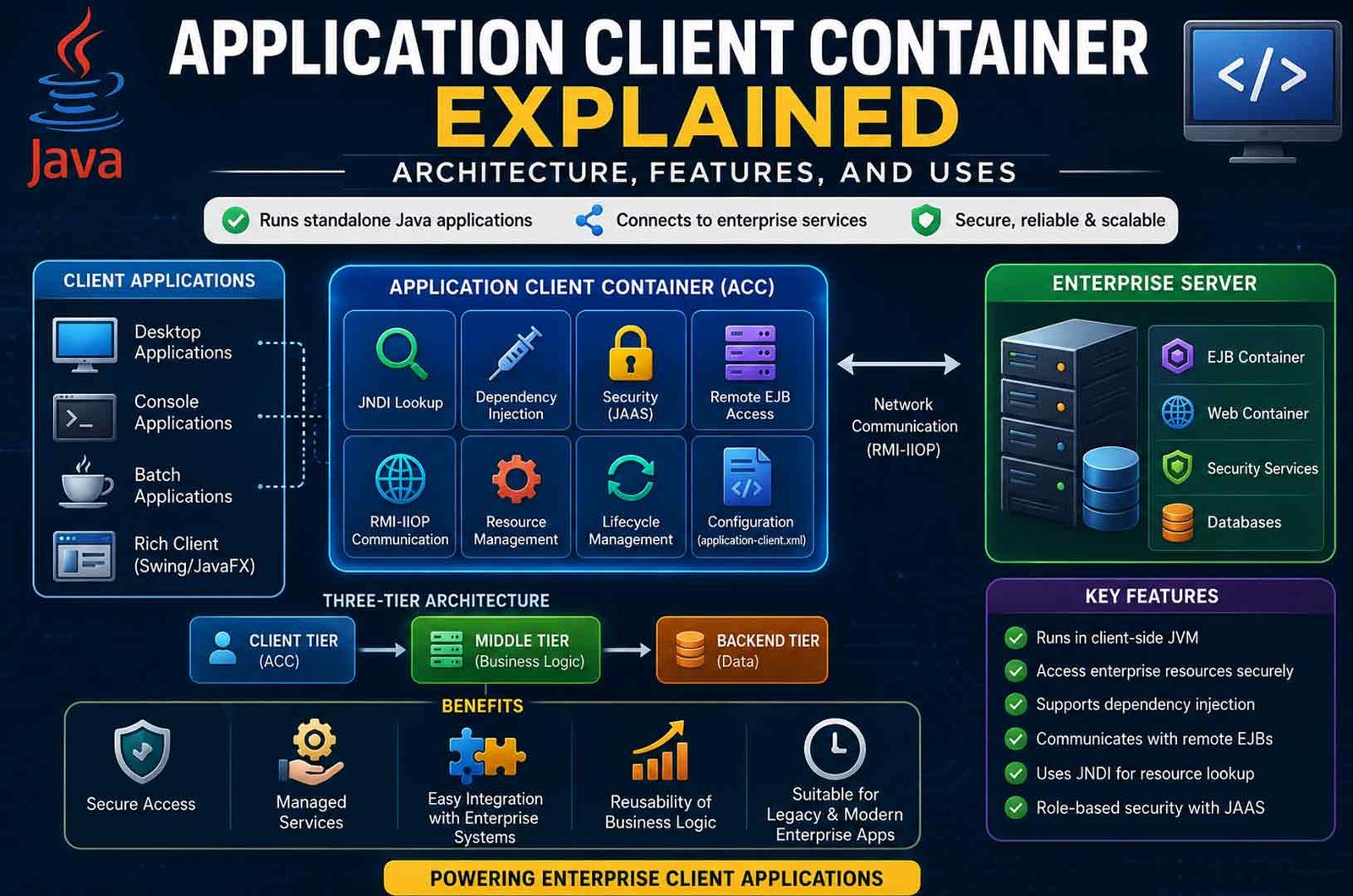
The Application Client Container (ACC) is a part of Java EE, now called Jakarta EE, that runs standalone Java applications with enterprise features. It allows desktop, console, and batch applications to connect directly to enterprise servers while using services such as dependency injection, security, and remote Enterprise JavaBeans (EJBs).
Many developers search for the Application Client Container because they need to understand how enterprise Java clients work, how they communicate with servers, and whether the ACC is still useful today. This article explains its architecture, components, working process, security, common uses, advantages, limitations, and modern alternatives in simple language.
What Is an Application Client Container?
An Application Client Container (ACC) is a managed environment that runs standalone Java applications in a Java EE or Jakarta EE system. Instead of running as a simple Java program, the application runs inside a container that provides enterprise services automatically.
The ACC makes it easier for a client application to communicate with an enterprise application server. It manages many tasks that developers would otherwise have to build themselves, such as security, resource lookup, dependency injection, and communication with remote business components.
Unlike browser-based applications, an ACC application runs on the user’s computer inside its own Java Virtual Machine (JVM). Because it performs much of its work on the client machine, it is often called a fat client or rich client.
A typical Application Client Container may be used for:
The container is not the application itself. Instead, it provides the runtime environment that manages the application and gives it access to enterprise services.
One of the biggest benefits of the ACC is that it lets developers focus on application logic instead of writing code for every enterprise service. The container handles many common tasks behind the scenes.
Where the ACC Fits in Jakarta EE Architecture
The Application Client Container is part of the traditional three-tier architecture used by Java EE and Jakarta EE applications. This architecture separates different parts of an application so that each layer has a clear responsibility.
Client Tier
The client tier is where the Application Client Container operates.
This layer includes applications that users interact with directly, such as desktop software or command-line programs. When these applications run inside the ACC, they gain access to enterprise services provided by the application server.
The client tier may contain:
-
Application client applications
-
Browser-based web clients
-
Desktop applications
-
Batch-processing programs
-
Console utilities
The ACC allows these applications to communicate with server-side components without manually handling every connection and configuration step.
Middle Tier
The middle tier contains the main business logic of the enterprise application.
This layer normally includes:
-
Web containers
-
EJB containers
-
Business services
-
Enterprise JavaBeans
-
Transaction management
-
Security services
When an ACC application requests information, the request is usually processed by components in this layer.
Backend Tier
The backend tier stores and manages the application’s data.
It may include:
The client application usually does not access these systems directly. Instead, it communicates with the middle tier, which safely handles the interaction.
Why Three-Tier Architecture Is Important
Separating the application into three layers makes enterprise systems easier to manage.
Each layer has its own responsibility.
-
The client tier handles the user interface.
-
The middle tier processes business rules.
-
The backend tier stores and manages data.
This separation also makes applications easier to maintain because changes in one layer usually have less effect on the others.
Thin Clients vs Fat Clients
One of the easiest ways to understand the Application Client Container is to compare thin clients and fat clients.
A thin client depends heavily on the server. Most processing happens on the server, while the client mainly displays information and sends requests.
A fat client, also called a rich client, performs much more work on the user’s computer. Applications managed by the Application Client Container belong to this category.
FeatureThin ClientFat Client (ACC)Runs InWeb browserClient-side JVMInterfaceHTML, CSS, JavaScriptSwing, JavaFX, ConsoleProcessingMostly server-sideMore client-side processingEnterprise AccessUsually through HTTP or REST APIsDirect enterprise access using technologies like JNDI and remote EJBsInstallationUsually none Client application installation may be requiredTypical UsePublic websites and web applications internal enterprise software
Thin clients are common because they are easy to update. Users simply open a web browser, and the latest version is available.
Fat clients require installation but often provide more direct access to enterprise resources. They can also continue performing certain tasks without relying on a browser interface.
For organizations with existing Java EE systems, fat clients managed by the ACC can offer better integration with enterprise services than a standard browser application.
Main Components of an Application Client Container
The Application Client Container provides several services that work together to support enterprise Java applications. Each component has a specific job during application startup and runtime.
Client-Side JVM
Every Application Client Container runs inside a Java Virtual Machine (JVM) on the client computer.
The JVM is responsible for running the Java application. It loads classes into memory, manages memory allocation, executes program instructions, and communicates with the operating system.
When the application starts through the ACC, the JVM is also configured with the correct libraries and settings required for enterprise communication.
Because the client depends on Java, the correct Java runtime must usually be installed before the application can run successfully.
Application Client JAR
The client application is normally packaged as a JAR (Java Archive) file.
This package can contain:
-
Application classes
-
The main entry point
-
Remote interfaces
-
Required libraries
-
Configuration files
-
Resource references
In many enterprise projects, the client JAR is packaged together with other modules inside an Enterprise Archive (EAR) file. The application server deploys the EAR and provides the client application when needed.
The exact packaging process can vary depending on the Jakarta EE version and the application server being used.
application-client.xml
The application-client.xml file is the deployment descriptor traditionally used for Java EE client applications.
This file can define important information such as:
-
The application’s main class
-
Enterprise resource references
-
EJB references
-
JMS resources
-
Security roles
-
Environment entries
-
Callback handler configuration
Modern Java EE and Jakarta EE versions also support annotations, which means many applications no longer require every setting to be placed inside this file.
However, the deployment descriptor is still useful for larger or more complex enterprise applications where configuration needs to remain separate from the source code.
JNDI
Java Naming and Directory Interface (JNDI) allows an application to find enterprise resources using logical names instead of hardcoded locations.
When an ACC application starts, the container prepares a JNDI environment. The application can then request resources such as:
-
Remote EJBs
-
JMS queues
-
JMS topics
-
Data sources
-
Environment entries
Using JNDI makes applications easier to configure because resource locations can be changed without modifying application code.
If a JNDI lookup fails, the cause is often an incorrect resource name, missing deployment, configuration error, or network problem.
Dependency Injection
The Application Client Container also supports Dependency Injection (DI).
Instead of creating or locating every object manually, developers can ask the container to provide required resources automatically.
Common annotations include:
This approach reduces boilerplate code and makes applications easier to maintain.
Dependency injection only works when the application is started inside a supported Application Client Container. Running the same application as a normal Java program may not provide these container-managed services.
Remote EJB Access
One of the main reasons for using an Application Client Container is access to remote Enterprise JavaBeans (EJBs).
A remote EJB contains business logic that runs on the application server. The client application calls methods on the server almost as if the objects were local.
The basic process is straightforward:
-
The client locates the remote EJB.
-
The request is sent to the application server.
-
The server performs the business operation.
-
The result is returned to the client.
This approach allows business logic to remain centralized while desktop applications continue to use enterprise services.
RMI-IIOP
Traditional Java EE remote communication often uses Remote Method Invocation over Internet Inter-ORB Protocol (RMI-IIOP).
This protocol allows Java applications to invoke methods on remote enterprise objects.
Although modern enterprise applications increasingly use REST APIs or other communication methods, RMI-IIOP remains part of many existing Java EE systems and legacy enterprise applications.
Support and configuration may differ between application servers and Jakarta EE versions.
JAAS Authentication
Security is another important service provided by the Application Client Container.
Many enterprise applications use Java Authentication and Authorization Service (JAAS) to verify users before allowing access to protected resources.
When authentication is enabled, the client collects the user’s credentials through a configured callback handler.
After successful login, the application server creates a security context that can be used for remote requests.
This allows enterprise applications to enforce role-based permissions without requiring every client application to implement its own authentication system.
How an Application Client Container Works
An Application Client Container follows a series of steps to prepare and run an enterprise Java application.
First, the developer creates a standalone Java application. It is then packaged as a client JAR, often together with other enterprise modules in an EAR file. The application is deployed to a Jakarta EE application server, which processes the client module and its configuration.
When the user launches the application through the server’s client launcher, the ACC prepares the runtime environment. It configures the Java Virtual Machine, loads required libraries, creates the JNDI environment, performs dependency injection, and initializes security services before the application begins its work.
If authentication is required, the user logs in through the configured security mechanism. After successful authentication, the client can access enterprise resources that match its assigned permissions.
When the application requests a remote service, the ACC sends the request to the application server. The server performs the business logic, communicates with databases or other enterprise systems if necessary, and returns the result to the client application.
This managed workflow allows developers to build enterprise desktop applications without manually handling every step of enterprise communication and security.Running an ACC Application with GlassFish
A common way to run an Application Client Container is through the GlassFish appclient tool. GlassFish is a Jakarta EE application server that provides a reference implementation for running ACC-based applications.
To start a client application, a command like this is used:
appclient -client MyAppClient.jar
This command prepares the full client environment before the application starts.
The launcher typically performs several tasks:
-
Starts the client-side JVM
-
Sets the correct classpath
-
Reads the application-client.xml descriptor
-
Configures JNDI and resource access
-
Initializes security settings
-
Performs dependency injection
-
Calls the main method of the client application
Before running the client, the enterprise application must already be deployed on the server. The client depends on server-side resources such as EJBs and security configuration.
Other Jakarta EE servers may provide similar tools, but the exact commands and setup steps can vary.
Application Client Container Security
Security is a core part of the Application Client Container. The ACC allows a standalone Java application to follow the same security rules as server-side components.
Authentication
Most ACC applications use JAAS (Java Authentication and Authorization Service).
-
The client collects user credentials.
-
A callback handler sends these credentials to the server.
-
The server verifies them against its security system.
If authentication fails, access to enterprise resources is blocked.
Authorization
After login, the user is assigned roles.
These roles control:
-
Which EJB methods can be called
-
Which resources can be accessed
-
What operations are allowed
This system helps enforce strict access control.
Secure Communication
The ACC can use SSL/TLS encryption for communication.
Security Context Propagation
Once a user is authenticated, their identity is attached to remote requests.
This allows the server to apply the same permissions when processing requests.
Key Security Practices
-
Do not store passwords in code
-
Use secure configuration files
-
Apply least-privilege roles
-
Keep certificates updated
-
Monitor login and access logs
These steps help protect enterprise systems from unauthorized access.
Web Container vs EJB Container vs Application Client Container
In Jakarta EE, different containers handle different parts of an application.
Web Container
-
Runs on the server
-
Manages web applications such as servlets and JSP
-
Handles HTTP requests from browsers
-
Supports dependency injection and security
EJB Container
-
Runs on the server
-
Manages Enterprise JavaBeans
-
Handles business logic, transactions, and security
-
Provides services like pooling and lifecycle management
Application Client Container
-
Runs on the client machine
-
Manages standalone Java applications
-
Provides access to enterprise services
-
Supports dependency injection, JNDI, and security
The main difference is location and purpose.
Together, these containers form a complete enterprise system.
Application Client Container vs Applet Container
The Application Client Container is sometimes confused with the old applet container, but they are very different.
Application Client Container
-
Runs standalone Java applications
-
Uses its own JVM
-
Supports dependency injection
-
Provides full access to enterprise services
-
Still used in some enterprise systems
Applet Container
-
Ran Java applets inside a web browser
-
Depended on browser plugins
-
Had limited access to enterprise resources
-
Did not support modern dependency injection
-
Is now obsolete and removed from modern browsers
Today, the applet container is no longer used, while the Application Client Container still exists in enterprise environments.
Common Uses of an Application Client Container
The Application Client Container is mainly used in enterprise environments where direct access to backend services is required.
Internal Business Applications
Many companies use ACC for internal tools such as:
These tools often need direct access to enterprise services.
Batch Processing
ACC clients can run background jobs such as:
These jobs often require secure access to enterprise resources.
Legacy Java EE Integration
The ACC is often used in systems that already rely on:
Replacing these systems can be difficult, so ACC remains useful.
Messaging Applications
ACC clients can interact with messaging systems such as:
This allows asynchronous communication between systems.
Desktop Reporting and POS Systems
Examples include:
These applications benefit from direct and secure communication with backend services.
Benefits of Using an ACC
The Application Client Container offers several advantages in enterprise systems.
-
Provides managed access to enterprise resources
-
Supports dependency injection in standalone applications
-
Reduces manual configuration work
-
Uses centralized authentication and authorization
-
Allows reuse of existing business logic
-
Supports secure communication
-
Integrates well with legacy Java EE systems
-
Enables rich desktop applications
These benefits make ACC useful for specific enterprise needs.
Drawbacks and Limitations
Despite its strengths, the Application Client Container has several limitations.
-
More complex setup than simple Java applications
-
Requires application-server libraries
-
Depends on server configuration
-
Harder to distribute and update client applications
-
Uses older communication methods like RMI-IIOP
-
Less suitable for modern cloud-based systems
-
Requires compatible Java versions
-
Can face firewall and network issues
-
Smaller developer community compared to modern tools
Because of these factors, many new applications use simpler alternatives.
System and Deployment Requirements
To run an Application Client Container, certain requirements must be met.
-
A compatible Java runtime (JDK or JRE)
-
Client application packaged as a JAR
-
Application-server client libraries
-
A launcher tool such as appclient
-
Deployed server-side components (EJBs, resources)
-
Network access to the server
-
Proper JNDI configuration
-
Security credentials
-
SSL certificates if encryption is used
Exact requirements depend on the application server and environment.
ACC Applications in Docker
In modern environments, an ACC application can be packaged inside a Docker container.
This container may include:
-
Java runtime
-
Client application
-
Required libraries
-
Configuration files
Benefits include:
However, Docker is usually better suited for background processes than desktop applications.
Common Problems and Troubleshooting
The Client Does Not Start
-
Check Java installation
-
Verify the launcher command
-
Confirm the main class exists
-
Check classpath and dependencies
JNDI Lookup Fails
Dependency Injection Does Not Work
Authentication Fails
Remote EJB Calls Fail
TLS or Certificate Errors
These steps can help identify and fix common issues.
Best Practices for ACC Development
-
Use dependency injection instead of manual lookup when possible
-
Keep configuration outside the code
-
Avoid hardcoding credentials
-
Use secure communication methods
-
Keep client and server versions compatible
-
Test applications using the official launcher
-
Handle errors properly
-
Use logging for debugging
-
Separate environments (development, testing, production)
Following these practices improves stability and security.
Is the Application Client Container Still Relevant?
The Application Client Container is still used, but its role is now limited.
It remains useful for:
However, most new applications use:
-
REST APIs
-
Microservices
-
Web-based interfaces
These modern approaches are easier to deploy and maintain.
Modern Alternatives to an ACC
Java Client with REST API
A simple Java application can call REST services over HTTP.
This is one of the most common alternatives.
gRPC
gRPC provides fast and structured communication.
Web Applications
Browser-based applications are widely used.
-
No installation required
-
Easy updates
-
Works on many devices
Messaging-Based Clients
Messaging systems allow asynchronous communication.
Lightweight Java SE Clients
A plain Java application without a container can be used when enterprise features are not needed.
Each alternative has its own strengths depending on the project requirements.
Bottom Line
The Application Client Container is a managed runtime for standalone Java enterprise applications. It provides services such as dependency injection, security, JNDI lookup, and remote EJB access.
It works best in existing Java EE or Jakarta EE systems where direct integration with enterprise services is required.
However, its complexity and reliance on older technologies make it less common in modern development. Many teams now prefer REST-based or cloud-native solutions.
Choosing whether to use ACC depends on the system architecture, security needs, and existing infrastructure.
(FAQs)
What is an Application Client Container?
It is a runtime environment that allows standalone Java applications to use enterprise services like security, dependency injection, and remote EJB access.
Where does an Application Client Container run?
It runs on the client machine inside a Java Virtual Machine.
Is application-client.xml required?
Not always. Modern applications can use annotations, but the descriptor is still useful for complex configurations.
Can an ACC access remote EJBs?
It can call remote Enterprise JavaBeans using technologies like JNDI and RMI-IIOP.
Is GlassFish required?
GlassFish is one implementation. Other Jakarta EE servers may provide similar support.
Can ACC applications run in Docker?
They can be packaged in Docker containers, especially for batch or background tasks.
Keep Reading:
G+ Games Explained: Features, Benefits, and Safety Guide








 Life Style1 year ago